
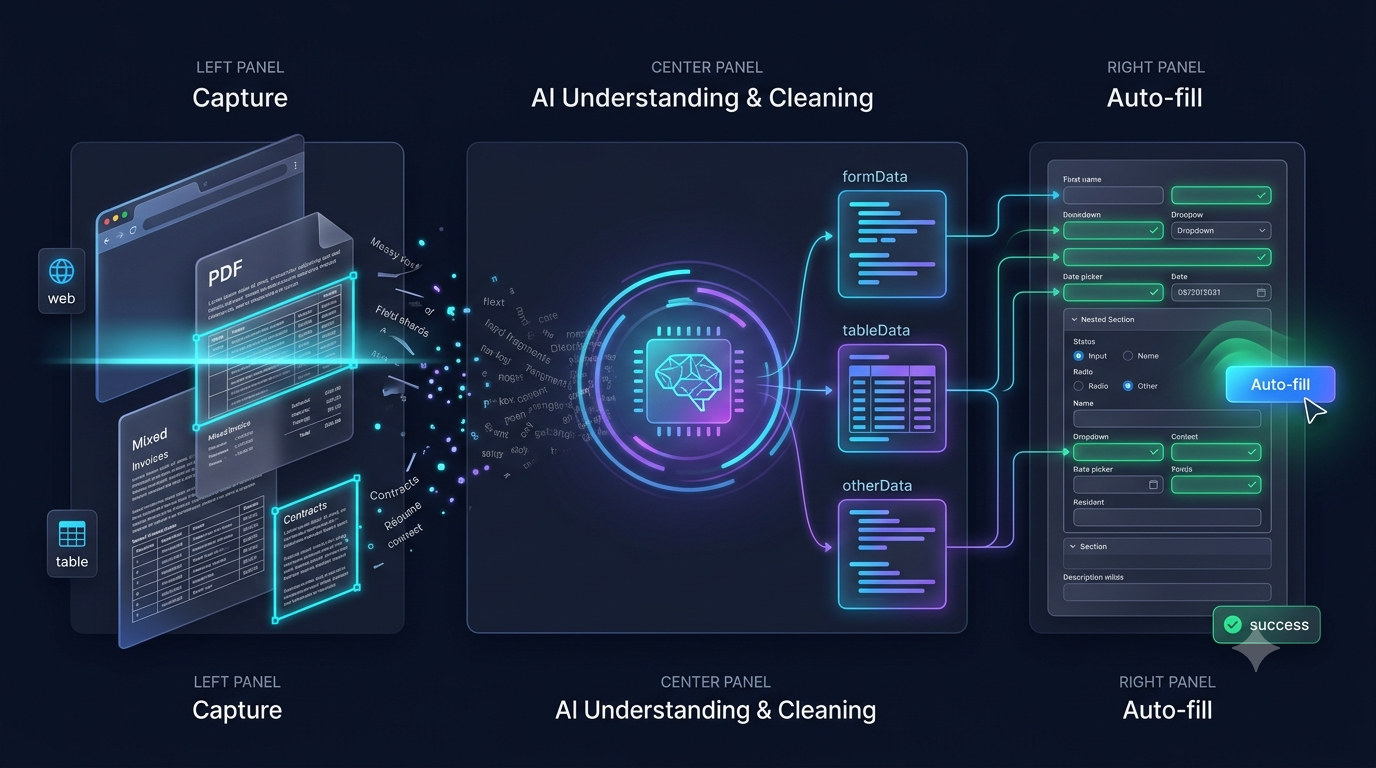
Capture the source page → AI understands the content → open the target form and watch it fill itself.
No credit card required • Works on Chrome & Edge • 100% Local & Secure
Three steps from capture to auto-filled form — no manual typing required
Open the page that holds your data — an email, a profile, a listing, a document — and let the extension capture it. One click, no text selection needed.
AI parses the text, identifies names, addresses, phone numbers, and other fields — then structures everything automatically.
Open any web form, click the extension icon, and watch every field fill itself in seconds.
From invoices and contracts to CRM entries and candidate registrations - AI Form Fills eliminates the repetitive copy-paste grind wherever forms are involved.
Extract invoice lines and contract details from emails or PDFs, then auto-fill them into accounting systems and ERP forms. No more manual re-typing.
Learn morePull prospect details from LinkedIn, websites, or email signatures straight into Salesforce, HubSpot, or any CRM form - in one click, not twenty fields.
Learn moreCapture a candidate's profile or resume page and instantly complete registration forms, ATS entries, and onboarding paperwork. One capture, every form filled.
Learn moreDesigned to eliminate repetitive data entry — not add more tools to your stack
Capture any web page in one tab — then auto-fill its data into any form in another. No more switching back and forth, no manual copy-paste.
AI understands context, not just label names. It knows "John Smith, 123 Main St" means a name and address — and maps them to the right fields, even when labels differ across sites.
Your data stays in your browser. No server storage, no data collection, no tracking. We don't want your data — we just want to help you fill forms faster.
No templates to build, no fields to map, no rules to set. Install it, capture a page, and auto-fill works instantly — the AI figures out the rest. Open the box and start filling.
All processing is 100% local. Nothing is stored, uploaded, or shared — ever. No server, no cloud, no exceptions.
All AI processing happens locally in your browser. We never store, collect, or sell your data — because we believe privacy isn't a feature, it's a right.
Your captured data and form inputs are processed in-memory and discarded immediately after filling.
We don't track what you capture, what forms you fill, or what websites you visit. Period.
Install and use the free tier without creating an account. No email, no sign-up, no strings attached.
Start saving hours on form filling today. No credit card required, 20 free uses every month.
No credit card required • Free Chrome Extension
Add to Chrome — It's FreeStart free, upgrade when you need more
For individuals
For power users
For heavy users
Install free, get 20 fills every month, and never copy-paste between forms again.
No credit card required • Free Chrome Extension • 20 free uses/month
Add to Chrome — It's FreeI built AI Form Fills to solve a problem I faced every single day: copying the same information — my name, address, phone number — across dozens of different websites and forms.
What started as a personal tool to save myself a few minutes each day gradually became a full Chrome extension used by recruiters, QA testers, and e-commerce operators who spend hours filling forms.
My goal is simple: make manual data entry a thing of the past. I hope AI Form Fills saves you as much time as it has saved me.
— malegeyuan, Maker of AI Form Fills
Everything you need to know about AI Form Fills
Yes! You can capture any web page — an email, a profile, a listing, a document — and Aiformfills will extract structured data from it. Then navigate to your target form and let the AI autofill it instantly. It's perfect for transferring data between platforms like CRM systems, job boards, or e-commerce platforms.
Yes! Aiformfills handles multi-step forms, dynamically loaded fields, and complex layouts. The AI understands form context, so even if fields appear conditionally or labels vary across sites, it maps your data correctly. For especially tricky forms, you can use custom prompts to guide the AI.
Yes — and it stays free. The free plan gives you 20 AI-powered form fills every month, no credit card required. You don't even need to create an account to use it. If you need more fills, paid plans start at $4.99/month for 200 fills.
No. AI Form Fills works out of the box with built-in AI processing - no API keys, no accounts with AI providers, no configuration. Install the extension and it just works. There's nothing to set up.
Absolutely. Your privacy is our top priority. All AI processing happens in real-time and your data is never stored on our servers. For free-tier users, data never leaves your browser. We don't track what you capture, what forms you fill, or what websites you visit. We comply with GDPR and CCPA privacy regulations.
The extension requests access to read web page content and modify form fields — this is necessary to capture source data and auto-fill forms. That's it. We don't read your browsing history, bookmarks, or any other sensitive data. The source of truth is always the permissions list on the Chrome Web Store listing.
Yes, this is one of our most powerful features! You can write custom prompts like "Translate product titles to English", "Reformat all dates to MM/DD/YYYY", or "Extract only phone numbers in international format". The AI follows your instructions to clean, format, and transform data exactly how you need it.
Aiformfills is compatible with virtually any web form — job applications on LinkedIn and Indeed, registration forms, checkout pages, CRM systems like Salesforce and HubSpot, government portals, and e-commerce product upload forms. If it's a form on the web, our AI can fill it.